Invertir en productos financieros conlleva riesgos. Las pérdidas pueden superar el valor de su inversión inicial.
Respuesta rápida
MetaTrader 4 en iPad funciona como la aplicación estándar de MT4 para iOS adaptada a tabletas. Instálela desde la App Store, inicie sesión con el servidor del bróker y sus credenciales de cuenta, y podrá colocar órdenes de mercado o pendientes, gestionar stops y graficar indicadores estándar. Los indicadores personalizados, los Expert Advisors y el probador de estrategias son exclusivos de la versión de escritorio y no funcionan en iPad.
MetaTrader 4 en iPad es la versión móvil oficial de MetaQuotes Software Corp, optimizada para la pantalla más grande del iPad. Es gratuita, funciona en iPadOS 13 o superior y admite las mismas cuentas de bróker que la terminal de escritorio. El formato del iPad aporta un valor real frente al iPhone: más espacio para gráficos, mejores listas de seguimiento de símbolos y un análisis multiventana más sencillo. Lo que no añade es paridad con la versión de escritorio. Los EAs, los indicadores personalizados y el probador de estrategias siguen siendo exclusivos de escritorio. A continuación, se detalla la configuración y las soluciones para estas limitaciones.
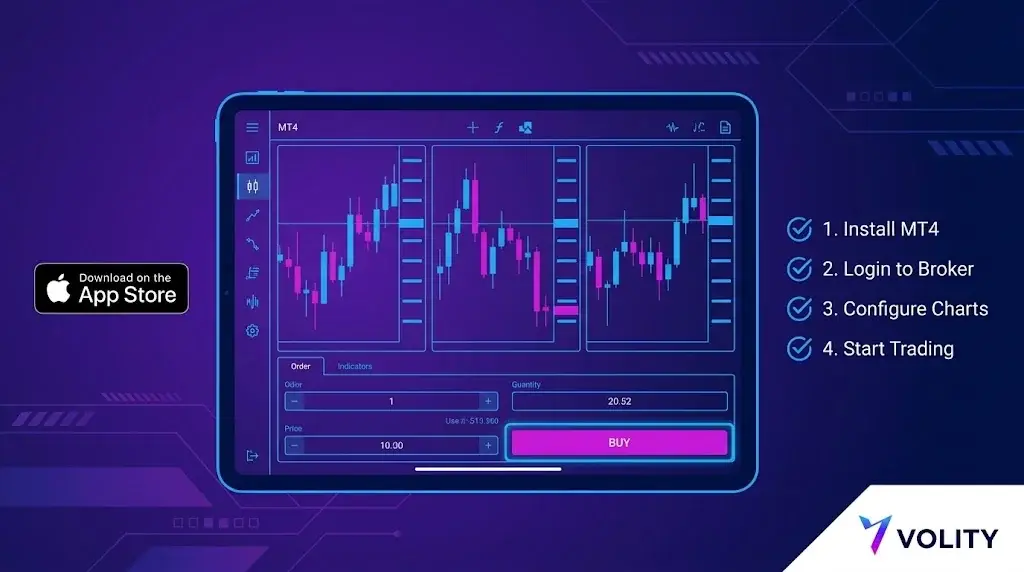
Paso 1: instalar la aplicación
Abra la App Store en el iPad y busque «MetaTrader 4». El editor oficial es MetaQuotes Ltd. No instale clones de terceros; solo la versión de MetaQuotes se conecta de forma fiable a los servidores de brókeres reales y recibe actualizaciones de seguridad. La descarga ocupa aproximadamente 90 MB.
Paso 2
Necesitará tres datos de su bróker:
- Nombre del servidor (por ejemplo, «BrokerName-Live» o «BrokerName-Demo»)
- Número de inicio de sesión (numérico, asignado al abrir la cuenta)
- Contraseña
En la aplicación: Ajustes, Gestionar cuentas, icono de más, Conectar a una cuenta existente. Busque por el nombre del bróker; la aplicación obtiene la lista de servidores del directorio de MetaQuotes. Elija el servidor que coincida con su tipo de cuenta. Las cuentas reales y demo se diferencian por el servidor, no por las credenciales.
Paso 3
La aplicación para iPad admite hasta cuatro ventanas de gráficos simultáneamente en modo horizontal, y dos en vertical. Toque el icono de gráficos para añadir nuevos; toque el encabezado del símbolo para cambiar de instrumento. Los marcos temporales predeterminados van desde M1 hasta MN, y se pueden cambiar mediante la etiqueta de marco temporal.
Indicadores integrados: alrededor de 30, incluyendo medias móviles, Bandas de Bollinger, MACD, RSI, Estocástico e Ichimoku. Herramientas de dibujo: líneas de tendencia, Fibonacci, canales y texto. Todo se opera mediante la pantalla táctil.
Paso 4
Toque el encabezado del símbolo en un gráfico y luego «Nueva orden». Tipos de orden disponibles en MT4 para iPad:
- Ejecución por mercado
- Buy limit, sell limit
- Buy stop, sell stop
El stop-loss y el take-profit pueden añadirse al introducir la orden o modificarse después tocando la posición en la pestaña Trading. El trading con un solo clic se puede configurar en Ajustes.
Limitaciones específicas del iPad
Tres restricciones a tener en cuenta:
- Sin ejecución de Expert Advisors. Los EAs solo funcionan en la terminal de escritorio o mediante un VPS. La aplicación para iPad no puede alojar ni ejecutar código MQL4.
- Sin indicadores personalizados. Solo se dispone de la biblioteca integrada. Cualquier elemento creado por la comunidad o propietario no se cargará.
- Sin probador de estrategias. El backtesting y la optimización son exclusivos de escritorio. El iPad está diseñado para la ejecución en tiempo real y el análisis de gráficos.
Lo que funciona especialmente bien en el iPad
Tres áreas donde el formato del iPad destaca:
- Análisis de gráficos multiventana. Cuatro gráficos a la vez, cada uno con un marco temporal o símbolo diferente, permite a un trader discrecional leer el contexto de un vistazo de una forma que el iPhone no puede.
- Anotaciones con Apple Pencil. Las líneas de tendencia y los niveles de Fibonacci dibujados con Apple Pencil son notablemente más precisos que con el toque en el iPhone.
- Notificaciones push. Las alertas de precios, ejecuciones de órdenes y eventos de la cuenta llegan en un segundo con una conexión estable. Configure cada alerta en la aplicación y luego habilite las notificaciones de iPadOS para MetaTrader 4.
Solución
La solución estándar es un VPS. El VPS de MT4 integrado de MetaQuotes se configura desde la terminal de escritorio en Herramientas, Hosting virtual, cuesta entre 10 y 20 USD al mes y funciona 24/5 de forma independiente a sus dispositivos locales. Su EA se ejecuta en el VPS mientras usted realiza operaciones discrecionales desde el iPad en la misma cuenta. Ambas terminales ven el mismo historial de operaciones.
Solución
Si depende de un indicador personalizado, hay dos caminos prácticos:
- Ejecutar el indicador en la terminal de escritorio y utilizar alertas de precios para enviar una señal al iPad mediante notificación push.
- Utilizar una herramienta de gráficos independiente en el iPad para el análisis y colocar las órdenes en la aplicación MT4 para iPad una vez identificada la señal.
Gestión de la conexión
El protocolo MT4 consulta el servidor con frecuencia cuando la aplicación está en primer plano. Dos notas prácticas:
- El cambio entre Wi-Fi y datos móviles durante una operación activa puede cancelar la orden antes de la confirmación. La aplicación reintenta al reconectarse, pero no garantiza la ejecución al precio original. Si coloca una orden mediante datos móviles, espere a la confirmación.
- El consumo de batería en una sesión de gráficos activa es de aproximadamente 6-10 % por hora. Planifique en consecuencia para sesiones largas.
Lista de verificación de seguridad antes de depositar fondos
- Habilite Face ID o Touch ID para acceder a la aplicación (Ajustes, Autorización).
- Habilite la autenticación de dos factores en el área de cliente del bróker.
- Verifique que el servidor al que se conectó coincida con la lista de servidores publicada por el bróker.
- Pruebe con una retirada pequeña antes de depositar fondos significativos. Las retiradas suelen procesarse en el área de cliente del bróker, no en la aplicación MT4.
MT4 en iPad en Volity
Volity es compatible con MetaTrader 4 en iPad para clientes de UBK Markets Ltd (CySEC 186/12). La configuración sigue el flujo estándar de MetaQuotes descrito arriba; el nombre del servidor aparece en su área de cliente después del KYC. Las notificaciones push, los diseños multigráfico y todos los tipos de órdenes estándar de MT4 están disponibles. Se aplican los límites de apalancamiento minorista de ESMA (1:30 para divisas principales, 1:20 para divisas secundarias e índices principales, 1:10 para materias primas, 1:5 para acciones, 1:2 para cripto). La protección contra saldo negativo es contractual.
Volity opera una plataforma de trading y también publica contenido educativo y analítico sobre trading. El contenido de esta página es solo con fines educativos y no debe considerarse asesoramiento financiero. Volity puede beneficiarse comercialmente cuando los lectores abren cuentas de trading a través de enlaces en este sitio.
Nuestro contenido se produce y revisa según normas editoriales documentadas; consulte nuestra metodología de comparación y revisión.
Preguntas frecuentes
¿MetaTrader funciona de forma nativa en iPad?
Sí, MetaQuotes publica versiones compatibles con iPad de MT4 y MT5. El diseño aprovecha la pantalla mayor para los gráficos, pero la aplicación sigue siendo un terminal de negociación y no un sustituto completo del escritorio.
¿Puedo ejecutar estrategias automatizadas desde un iPad?
No. Los Expert Advisors requieren el terminal de escritorio o un entorno alojado como un VPS. La aplicación para iPad sirve para colocar, gestionar y supervisar órdenes.
¿Por qué no encuentro el servidor de mi bróker en el iPad?
La búsqueda de la aplicación solo lista servidores registrados en MetaQuotes. Si falta el suyo, el bróker publica la dirección exacta del servidor, que puede introducir manualmente en la pantalla de acceso.