Funding a Hyperliquid account from Volity is a three-part job: connect or create the account at the venue, deposit from your Volity USD wallet, then trade on Hyperliquid and track the balance from your dashboard. The Markets screen in Volity handles the connection and the funding. The trading happens on Hyperliquid, where your margin and your positions sit. This guide walks the flow in order and spends most of its time on what actually catches people out, which is where the money lands and how to read the numbers once a position is open.
The Crypto Trading Starter Kit
A plain-English PDF: what to check before you trade, how orders and risk really work, and the mistakes to skip. Get it free.
TL;DR / Quick insight: Open the Markets section of your Volity dashboard, connect or create a Hyperliquid account, then use Deposit money to fund it from your Volity USD wallet. Margin at Hyperliquid is denominated in USDC and sits on HyperCore, the half of the chain that runs the order books and the margin engine. Once funded, you trade on Hyperliquid and the panel in Volity mirrors available balance, account value, margin used, open positions and unrealised P&L, labelled held at Hyperliquid. The balance and the positions are held at Hyperliquid, not at Volity.
Nothing here is personal advice. Perpetual futures are leveraged instruments. A position can be closed against you at a loss you did not choose, and leverage amplifies the size of that loss relative to the money you put up.
What you need before you start
The deposit step will not do anything useful until a few pieces are already in place: a funded Volity USD wallet, a Hyperliquid account you can log into, and a clear idea of the instrument you are about to trade.
- Dollars in your Volity wallet. The Markets screen funds the venue from your USD balance, so the balance has to exist first. Topping up the wallet is a separate job from funding the venue.
- A login method you will still control next year. Hyperliquid lets you trade with a normal defi wallet or by logging in with an email address. Either route ties your positions to a specific account. Losing the route loses the account.
- An understanding of what a perpetual is. Margin is not a deposit you get back on demand while a position is open. It is collateral that the venue can consume.
If the venue itself is new to you, read our explainer on what Hyperliquid is first. It covers the on-chain order book, the consensus layer underneath it and why the whole thing behaves differently from a centralised exchange. Money in a venue you do not understand is money at risk for no reason.
Connect or create your Hyperliquid account
Open the Markets section of your Volity dashboard, headed “Trade and prediction markets”, and use the Open Hyperliquid control. That takes you to the venue to sign in or register.
The email route is the shorter one. You enter an address, a six-digit code arrives, you type it in, and the account exists. The wallet route asks for one extra step that people miss: after connecting an EVM wallet such as MetaMask, Rabby or Phantom, you have to click Enable Trading and sign a gas-less transaction before the account can do anything. Skip it and the deposit lands in an account that cannot place an order.
Pick one method and stay with it. A different login is a different account, with a different balance, and no amount of support correspondence turns one into the other. Never share a private key, a seed phrase or a six-digit login code with anyone, including somebody claiming to be support staff.
Deposit from your Volity USD wallet
With the account connected, the Deposit money control on the Markets screen moves value from your Volity USD wallet to your Hyperliquid account. You choose the amount in dollars. Volity handles the conversion and the transfer, and the funds show up as spendable margin at the venue.
What you are avoiding here is the manual version, which has more edges than it looks. Done by hand, funding Hyperliquid means holding USDC and ETH for gas on the Arbitrum network, because the native bridge runs between Hyperliquid and Arbitrum, then sending the USDC through that bridge yourself. Arbitrum is documented by its own team as a blockchain platform built on Ethereum, so you are also managing a second chain’s gas balance to move a dollar balance. Every one of those steps is a place to send funds to the wrong address on the wrong network.
The bridge itself is worth understanding even when you never touch it. Deposits are credited once more than two thirds of the staking power has signed them, and withdrawals run the same signing process in reverse, followed by a dispute period before the funds are released. The venue documents a flat withdrawal gas fee of 1 USDC, charged so validators can cover the Arbitrum gas of the withdrawal, which means Arbitrum ETH is not something you need on the way out. Those are the venue’s published mechanics as of 2 August 2026, and venue mechanics change, so check the current page before you rely on a figure.
Why margin arrives as USDC and where it lands
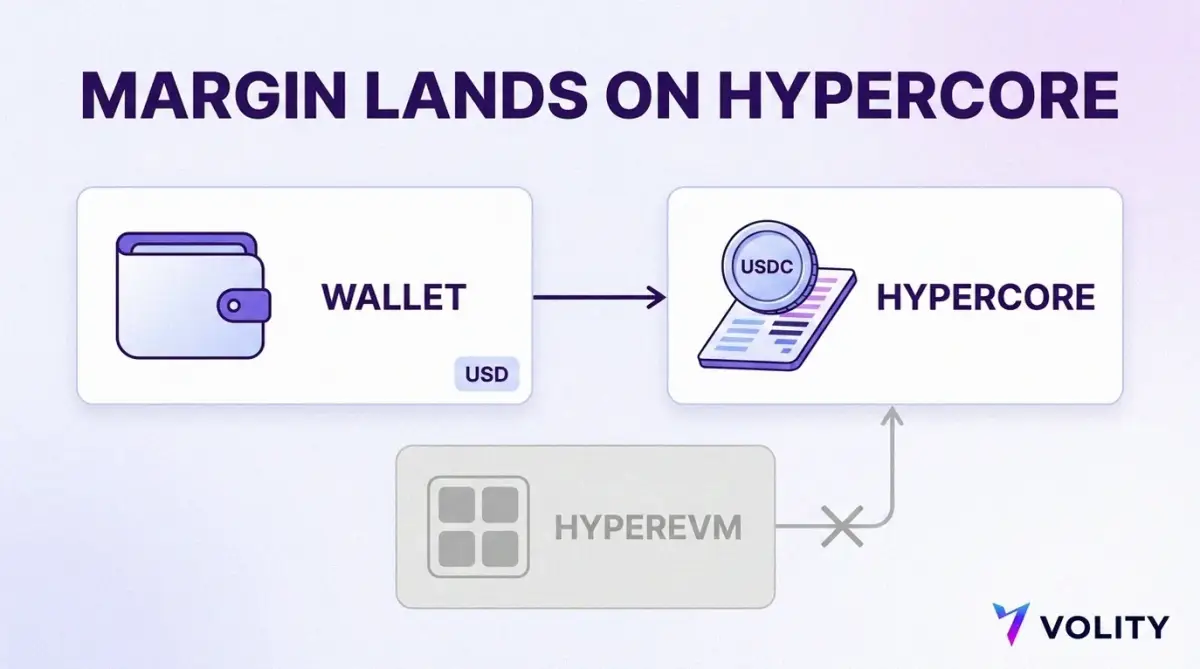
Hyperliquid does not hold dollars in a bank account for you. Its perpetual contracts are collateralised in USDC, so a dollar balance has to become a dollar stablecoin balance somewhere along the way, and that is the step Volity performs for you. USDC is a fiat-backed stablecoin, which Ethereum’s own documentation describes as a digital representation of a traditional currency you can buy at a 1:1 ratio and redeem with the issuer. Circle, the issuer, states that USDC is backed 100% by highly liquid cash and cash-equivalent assets and always redeemable 1:1 for US dollars, with monthly third-party assurance that reserves exceed the amount in circulation.
The part that confuses newcomers is not the currency. It is the destination. Hyperliquid runs two execution environments on one chain, HyperCore and the general-purpose HyperEVM, with HyperCore holding the margin and matching engine state. The venue is explicit that the HyperEVM is not a separate chain but is secured by the same HyperBFT consensus, so there is no bridging risk between the two as one unified state. Same chain, same validators, no bridge in the risky sense of the word.
Your balances still live in one place or the other. Perp margin sits in the HyperCore clearinghouse, which manages the perps margin state for each address and credits deposits first to the cross margin balance. Applications built on the HyperEVM read a different balance entirely. Moving spot value between the two is a deliberate action: the venue documents a Transfer to and from EVM control on the balances table, notes that the transfer costs gas in HYPE in whichever direction you send it, and warns that each spot asset has a unique transfer address and sending the wrong asset to it will lose the asset.
For funding a trading account, the good news is that the default route lands where you need it. The venue’s onboarding documentation states plainly that a USDC deposit arrives as USDC on HyperCore, which is the balance that margins a perpetual position. You do not need to visit the EVM side at all to open a trade. Someone who wanders over there and moves funds across will find their margin has simply gone missing from the trading screen, because it is now sitting in the environment that does not run the order book. If stablecoin collateral in general is the bit you want to understand properly, our guide to USDC margin takes it apart.
Stablecoins are moving into formal regulation rather than sitting outside it. The Bank of England has published its policy positions on sterling-denominated systemic stablecoins. Rules differ by currency and jurisdiction, and a dollar stablecoin is not a bank deposit under any of them.
Trade on Hyperliquid and track the balance in Volity
Once the funds land, the trading happens at the venue. You open Hyperliquid, choose a market, set a direction and a size, and place the order. Perpetual contracts have no expiry date, so a position stays open until you close it or it is closed for you.
Leverage is where a perpetual stops resembling a spot purchase. Hyperliquid’s documentation records that maximum leverage varies by asset, ranging from 3x to 40x, and that you set your own leverage anywhere between 1 and that ceiling. A 10x position moves ten times as fast as the underlying in both directions. The venue is blunt that leverage is only checked when a position is opened, after which the user is responsible for monitoring leverage usage to avoid liquidation. Nobody rings you.
Two running costs sit alongside the price. Trading fees are charged on your rolling volume: the published perps schedule starts at a 0.045% taker and 0.015% maker base rate at the entry tier, assessed on 14-day weighted volume, as of 2 August 2026. Funding is separate and is not a fee to the venue at all. Hyperliquid pays it every hour, peer to peer, with no fees collected on the payments, from one side of the contract to the other depending on whether the perpetual trades above or below the spot oracle price. Hold a position long enough and funding becomes a real number. Our breakdown of Hyperliquid fees works through both.
Back in Volity, the Markets screen shows the connected venue with a Refresh control and a timestamp, so you can pull the current figures without leaving the dashboard.
How to read available balance, account value and margin used
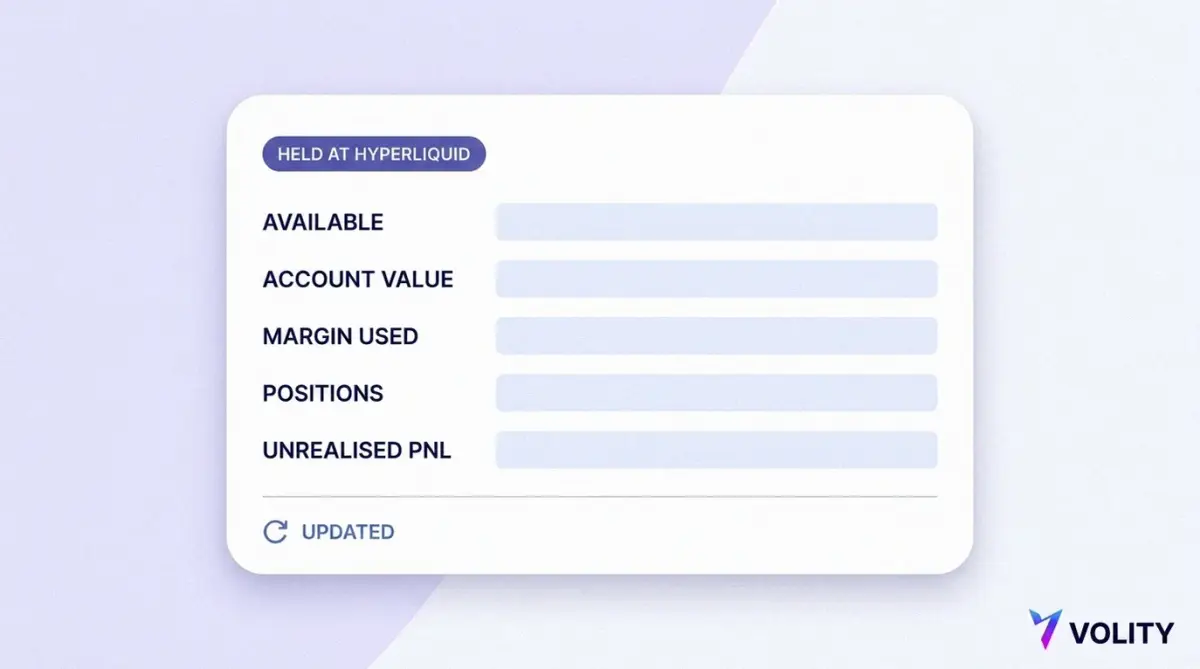
The Hyperliquid panel in Volity shows available balance, account value, margin used, open positions and unrealised P&L, all in USDC. Reading them correctly is the difference between a considered position and an accidental liquidation.
| Field | What it is telling you |
|---|---|
| Account value | Your collateral including unrealised profit and loss. This is the number the venue measures against your maintenance margin. |
| Margin used | Collateral committed to open positions. For a cross margin position the initial margin cannot be withdrawn while the position is open. |
| Available balance | The part of your collateral that is not committed. It is what you can put behind a new position. |
| Open positions | What you are actually exposed to, by market and by size. Notional size, not margin, drives your risk. |
| Unrealised P&L | Profit or loss on open positions at the current mark price. It moves your account value continuously and it is not money you have banked. |
Margin used follows a formula, not a judgement call. Hyperliquid computes the margin required to open a position as position size multiplied by mark price, divided by leverage. Deposit $2,000 and open a $5,000 notional position at 5x and margin used is $1,000, leaving $1,000 available. Unrealised profit on a cross margin position becomes usable as initial margin for new positions, which is convenient and is also how accounts quietly become larger than their owner intended.
Taking money back out is deliberately harder than putting it in. The same page sets the transfer requirement as the greater of the initial margin required and 10% of the total notional value of all open positions, and that rule covers withdrawals, transfers to the spot wallet and isolated margin moves alike. In the example above, the greater of $1,000 and $500 is $1,000, so $1,000 stays put while the position is open.
The number that actually ends positions is maintenance margin. A cross position is liquidated when account value including unrealised P&L falls below the maintenance margin times the total open notional, and maintenance margin is set at half the initial margin at maximum leverage. In practice the venue documents that as between 1.25% for assets with 40x maximum leverage and 16.7% for assets capped at 3x. On a $5,000 notional position in a 40x asset, that is $62.50 of account value standing between you and a forced close.
The liquidation itself is mechanical. Positions are first sent to the order book as market orders, and anything left over is kept by the trader. If account value drops below two thirds of the maintenance margin before that works, a backstop liquidation takes the position over and the maintenance margin is not returned to you. The venue recommends stop-loss orders or an early exit as the way to avoid that outcome. Liquidations run off the mark price, which blends external exchange prices with Hyperliquid’s own book, so the trigger is not simply the last price you saw on the chart. Our deeper guide to margin health and liquidation price works through the panel field by field.
Checklist before your first position
Run through the following before you commit margin to a market.
- Confirm you are logged into Hyperliquid with the same method you registered with.
- If you connected a wallet, confirm you completed the Enable Trading signature.
- Fund a small test amount first and confirm it appears at the venue before sending more.
- Check that the balance shows on HyperCore, which is the balance that margins a position.
- Decide your leverage before you open, not after the price moves.
- Note the liquidation price the venue shows you, and treat it as an estimate rather than a promise.
- Plan the exit and the withdrawal route before you need either.
- Size the position as money you can lose in full.
That last line is not decoration. The Bank for International Settlements looked at retail crypto app users after the 2022 collapses and found that a majority of users in nearly all economies studied had lost money on their bitcoin holdings, with smaller investors buying while larger ones sold. Leverage does not change those odds in your favour. It shortens the time the market has to be wrong about you before the position is gone.
Where Volity fits
Volity is the funding and tracking layer for this. The Markets screen connects the venue, moves dollars out of your wallet into it, and shows you the resulting balance next to everything else you hold, so one question does not require three logins. The trading itself is yours to do, on Hyperliquid, under Hyperliquid’s terms.
Balances and positions are held on the external platform, not by Volity. Trading, availability and withdrawals are subject to that platform’s own terms, and Volity does not place or manage orders on your behalf. That is not a technicality. It decides who you talk to when something goes wrong and what protections apply when it does.
The general pattern of linking a venue to your wallet is covered in our guide to connecting external trading platforms, and the return leg is in withdrawing from an external trading platform. The rest of our crypto guides fill in the background.
How long does a Hyperliquid deposit take?
Treat a deposit as done when the balance is visible at the venue, not when you press the button. On the venue side, a bridged deposit is credited once more than two thirds of the validator staking power has signed it, so confirmation depends on the network rather than on a fixed schedule. Use the Refresh control on the Markets screen to pull the current figures, and send a small test amount the first time.
What is the difference between available balance and account value?
Account value is your whole collateral position including unrealised profit and loss, and it is the figure the venue compares against your maintenance margin. Available balance is the part of that collateral not committed to open positions, so it is what you can put behind a new trade. A position can be perfectly healthy on account value while available balance reads close to zero, which simply means most of your collateral is working.
Do I need to bridge anything myself?
Not when you fund through Volity. The Markets screen moves dollars from your Volity wallet to your Hyperliquid account for you, and the venue’s documented deposit route delivers USDC to HyperCore, which is the balance that margins a perpetual position. The HyperEVM is a separate balance environment on the same chain, and moving spot value across to it is a deliberate transfer that costs gas, so there is no reason to go near it before opening a trade.
Where are my funds actually held?
At Hyperliquid, in the account tied to your login, as USDC collateral on HyperCore. Volity shows you the balance and moves funds into the venue, and the venue holds the balance and the positions. Trading, availability and withdrawals follow that platform’s terms, and Volity does not place or manage orders on your behalf.
Can I withdraw at any time?
Free collateral, yes. Collateral committed to an open position, no. Hyperliquid requires the margin remaining after any transfer out to be at least the greater of the initial margin required and 10% of the total notional value of your open positions, and that requirement covers withdrawals as well as internal transfers. Closing or reducing a position releases the margin behind it, which is why planning the exit matters as much as planning the entry.